
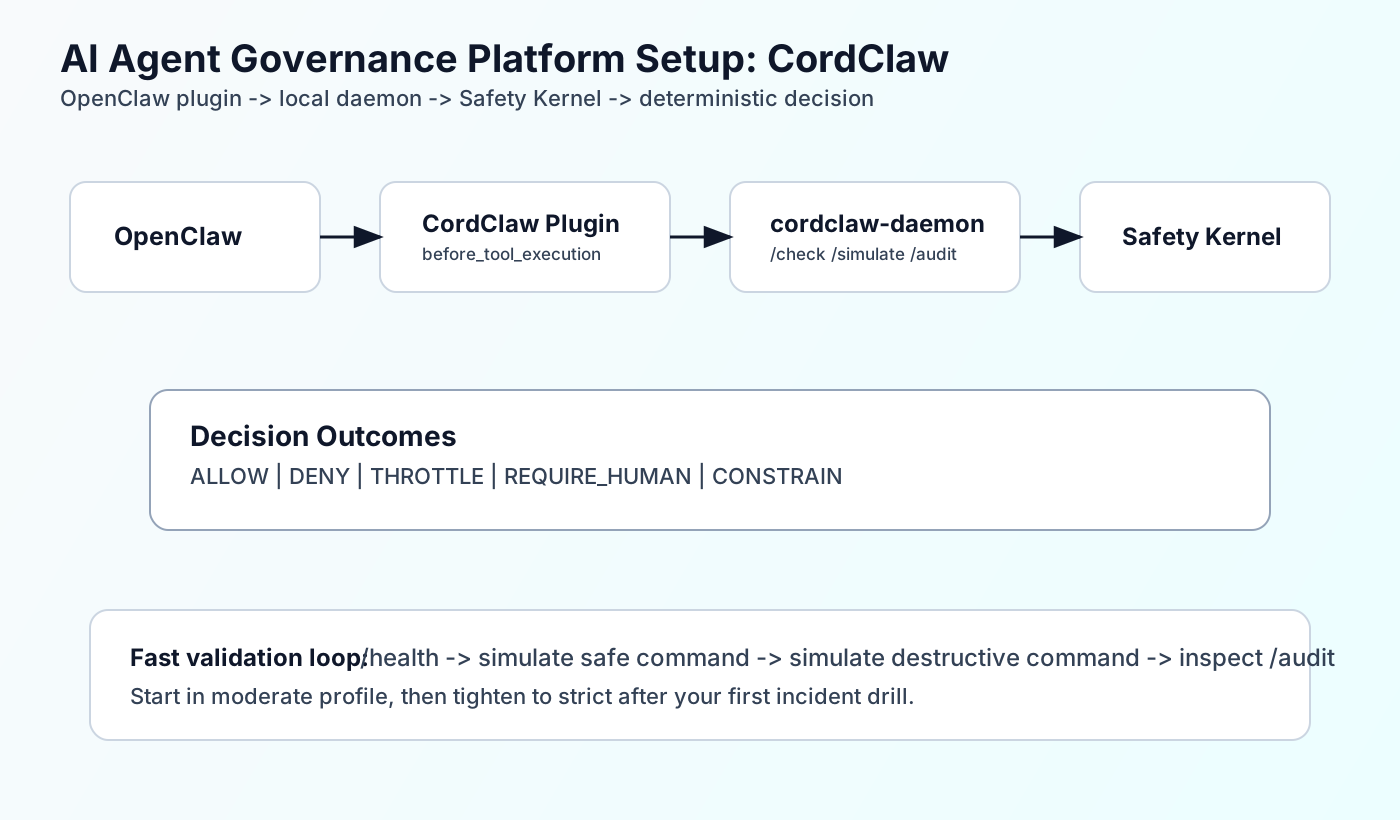
The production problem
Teams often attempt an AI agent governance platform setup by adding text filters near prompts and calling it done. Then an agent reaches a real tool call and there is no deterministic pre-dispatch gate, no approval boundary, and no fast audit answer for what just happened.
The issue is not missing ideas. The issue is missing wiring. If policy checks do not sit on the execution path, they are advisory text, not control.
What top articles cover vs miss
I reviewed the top ranking documentation pages for guardrails tutorials. They are useful. They still leave a deployment gap for OpenClaw operators.
| Source | Strong coverage | Missing piece |
|---|---|---|
| OpenAI Agents SDK Guardrails | Input, output, and tool guardrails, plus execution modes (parallel vs blocking). | No OpenClaw plugin wiring, daemon health checks, or profile-based rollout with local simulation payloads. |
| LangChain Guardrails | Middleware hooks, PII handling, and human-in-the-loop integration patterns. | No deterministic sidecar control path with explicit fail modes and per-decision audit endpoint checks. |
| Amazon Bedrock Guardrails | Policy filters (content, denied topics, PII, grounding checks) and guardrail testing workflow. | No local OpenClaw runtime integration, plugin behavior under daemon outage, or command-level policy profile examples. |
AI Agent Governance Platform Setup Prerequisites
From `docs/GETTING_STARTED.md`, the minimum local prerequisites are:
- Docker + `docker compose`
- `curl` and `openssl`
- Node.js + npm
- Optional but useful: OpenClaw CLI (`openclaw`)
Expected outcome after setup: daemon health on `127.0.0.1:19090`, successful simulation of a safe command, and deny behavior for a destructive command.
AI Agent Governance Platform Setup Steps (CordClaw + OpenClaw)
Step 1: Install CordClaw and select mode
Start from the repository root and run the installer. `CORDUM_UPGRADE` controls whether you also stand up the full local Cordum stack.
cd setup
OPENCLAW_SKIP=true ./install.sh

# Optional mode selection
CORDUM_UPGRADE=false OPENCLAW_SKIP=true ./install.sh
CORDUM_UPGRADE=true OPENCLAW_SKIP=true ./install.sh

# Optional baseline policy profile
CORDCLAW_PROFILE=moderate OPENCLAW_SKIP=true ./install.sh
Step 2: Verify first policy decisions
Run both an allow-path and deny-path simulation. You want proof before attaching governance to real write paths.
curl -sS http://127.0.0.1:19090/health | jq .
openclaw cordclaw status

openclaw cordclaw simulate --tool exec --command "echo hello"
openclaw cordclaw simulate --tool exec --command "rm -rf /"

curl -sS "http://127.0.0.1:19090/audit?limit=20" | jq .
Step 3: Tune policy profile by risk appetite
Profiles are shipped in `~/.cordclaw/templates/` and copied to `~/.cordclaw/config/safety.yaml`.
| Profile | Behavior | Best fit |
|---|---|---|
| strict | Requires approval for all `exec` and file writes. Blocks autonomous scheduling by default. | Regulated or high-risk environments where friction is acceptable. |
| moderate | Denies destructive/cloud/remote-access commands. Requires approval for package installs and deploy-like actions. | Most teams starting production governance without stopping daily work. |
| permissive | Allows most actions but still denies destructive and secrets-tagged operations. | Low-risk internal automation where speed is the top priority. |
cp ~/.cordclaw/templates/policy-strict.yaml ~/.cordclaw/config/safety.yaml
cd ~/.cordclaw
docker compose --env-file .env restart safety-kernel

openclaw cordclaw simulate --tool exec --command "echo check profile"
openclaw cordclaw simulate --tool exec --command "rm -rf /"
Step 4: Configure plugin behavior explicitly
Installer defaults plugin timeout to `500ms` and plugin fail mode to `deny` if daemon is unreachable. Keep that explicit in your OpenClaw config.
plugins:
  entries:
    cordclaw:
      enabled: true
      config:
        daemonUrl: "http://127.0.0.1:19090"
        timeoutMs: 500
        failMode: "deny"
        logDecisions: true
Step 5: Connect to existing Cordum Safety Kernel (optional)
If you skip local stack startup, set remote env values and start the daemon against your existing environment.
set -a
source examples/env/cordclaw-remote.env
set +a

cordclaw-daemon
curl -sS http://127.0.0.1:19090/status | jq .
Limitations and tradeoffs
- `docs/POLICY_GUIDE.md`, `docs/THREAT_MODEL.md`, and `docs/TROUBLESHOOTING.md` are placeholders in the current CordClaw repo snapshot, so rely on code-level behavior for critical assumptions.
- Daemon audit entries are in-memory (`auditSize=1000` in `server.go`), so this is operational telemetry, not durable evidence storage by itself.
- Standalone install can skip daemon startup unless `CORDCLAW_KERNEL_ADDR` and `CORDCLAW_API_KEY` are set.
- Plugin fallback and daemon fallback are separate controls: plugin `failMode` handles daemon outage, daemon `CORDCLAW_FAIL_MODE` handles Safety Kernel outage.
Dry but useful rule: if your threat-model document says “placeholder”, do not claim a finished threat model in a review deck.
Production hardening checklist
# 1) Enforce explicit daemon behavior
# Plugin fallback when daemon is unreachable:
# - failMode: deny | allow
#
# Daemon fallback when Safety Kernel is unreachable:
# - CORDCLAW_FAIL_MODE=graduated|closed|open

# 2) Pin environment defaults
export CORDCLAW_CACHE_TTL=5m
export CORDCLAW_CACHE_MAX_SIZE=10000
export CORDCLAW_LISTEN_ADDR=127.0.0.1:19090

# 3) Test policy snapshot refresh
# daemon clears local cache when snapshot changes

# 4) Add recurring simulation checks in CI
curl -sS -X POST http://127.0.0.1:19090/simulate   -H "Content-Type: application/json"   -d @examples/simulate/deny-destructive-exec.json | jq .

# 5) Monitor degraded/offline governance states
Add this checklist to your deployment runbook and verify it in staging before broad agent permissions are enabled.
FAQ
Frequently Asked Questions
What is the fastest AI agent governance platform setup path with CordClaw?
Do I need the full Cordum stack for CordClaw?
How can I test policy changes before real execution?
Where do I see governance decisions?
Next step
Run one real workflow in `moderate` profile, collect the audit output, then decide if your production baseline should stay in `moderate` or move to `strict`.
- Continue with How to Add Governance to OpenClaw.
- Review Configuration and Operations docs before rollout.
- Compare your path with custom policy design guidance.