
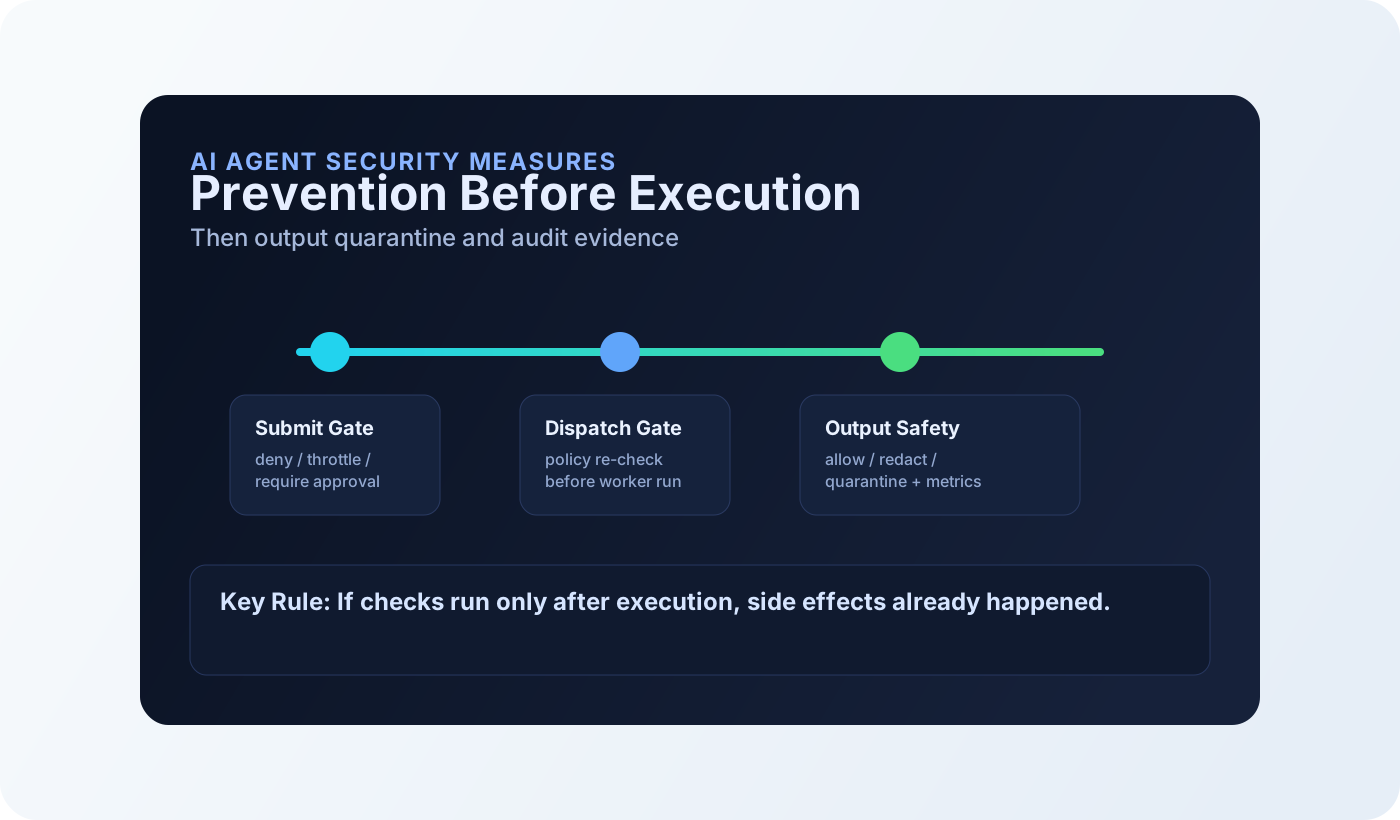
The production problem
Teams usually start with model-level guardrails and basic access controls. That helps, but it does not answer the operational question: what can the agent do after a malicious or ambiguous input?
If an agent can call deployment tools, open tickets, and write to data stores, you are not securing a chatbot. You are securing an autonomous operator with API keys.
Wiz frames the core risk correctly: agent security is about controlling what autonomous systems can change, not only what they can say. Their benchmark references 25 agent-model combinations and 257 offensive challenges, which is useful context for blast-radius thinking.
The missing piece in most guides is enforcement order. A deny decision made after a side effect is not prevention. It is documentation.
What top sources cover vs miss
| Source | Strong coverage | Missing piece |
|---|---|---|
| IBM: What is AI Agent Security? | Threat taxonomy and foundational controls: zero trust, least privilege, prompt validation, and microsegmentation. | No control-plane sequencing that shows exactly what gets blocked before queue publish vs after worker execution. |
| Fast.io: Practical Security Guide | Good operational hygiene: separate identities, file access boundaries, dependency scanning, and monitoring signals. | No policy snapshot binding, simulate/explain workflow, or deterministic approval/deny semantics across a scheduler path. |
| Wiz: AI Agent Security Best Practices | Strong identity framing and cloud attack-path thinking; useful reminder that agent risk is about what the agent can change. | No concrete API-level runbook for validating deny/approval/quarantine behavior in a live agent control plane. |
Gap summary: strong theory, weak runbooks. The rest of this guide closes that gap with deterministic control points and validation steps.
12 AI agent security measures
| Control | What fails without it | Implementation pattern | Tradeoff |
|---|---|---|---|
| 1. Dedicated non-human identity per agent | Shared credentials hide blast radius and kill auditability. | One identity per agent, individually revocable. No shared API keys. | More IAM objects to manage. |
| 2. Least privilege at capability scope | Agent reaches APIs and data it never needed. | Map capabilities/topics to narrow access scopes; review unused rights. | Requires periodic entitlement cleanup. |
| 3. Submit-time pre-dispatch policy gate | Unsafe jobs enter the queue before any check. | Evaluate policy before persistence/publish. Deny at API boundary. | Policy service latency sits on submit path. |
| 4. Dispatch-time pre-dispatch policy gate | A queued job bypasses submit assumptions after context changes. | Re-check policy in scheduler before routing to workers. | Extra dependency in dispatch hot path. |
| 5. Approval binding for high-risk actions | Production writes execute without human checkpoint. | Require approval and bind to policy snapshot + job hash. | Higher operational friction. |
| 6. Fail-mode policy for kernel outages | Implicit fail-open during safety service degradation. | Default to `closed`; document when `open` is allowed. | Closed mode can reduce availability. |
| 7. Output safety with quarantine/redaction | Secrets/PII leak through generated output despite safe input. | Post-exec checks with decisions: allow, redact, quarantine. | Cannot undo already executed side effects. |
| 8. Policy signature verification | Tampered policy bundle silently changes behavior. | Verify Ed25519 signatures; keep last-known-good fallback. | Key rotation and signer discipline required. |
| 9. Decision caching with explicit bounds | Policy checks become latency bottleneck under repeated traffic. | TTL cache with max size and invalidation on policy change. | Cache policy must be tested to avoid stale assumptions. |
| 10. Simulate/explain before rollout | Policy changes break production paths without warning. | Run `/policy/simulate` and `/policy/explain` in CI. | Needs representative fixtures. |
| 11. Metrics and anomaly alerts | Safety drift goes unnoticed until an incident. | Track deny/quarantine/fail-open counters and alert on spikes. | Alert fatigue without baseline tuning. |
| 12. Remediation path over blind retries | Teams bypass denied actions by retrying with weaker controls. | Use explicit remediations that rewrite topic/capability/labels. | Requires policy authors to maintain remediation quality. |
Control-plane implementation examples
Policy is where many teams get vague. Keep rules explicit, testable, and tied to tenant/topic/capability context.
rules:
  - id: deny-destructive-exec
    decision: deny
    reason: "destructive command class blocked"
    match:
      topics: ["job.exec.*"]
      labels:
        command_class: "destructive"

  - id: require-approval-prod-write
    decision: require_approval
    reason: "human review required for prod write"
    match:
      topics: ["job.deploy.*"]
      labels:
        env: "prod"
      capabilities: ["infra.write"]
Then test the decision path before rollout. Use simulation for deterministic checks and only then submit real jobs.
API=http://127.0.0.1:8081
KEY=<api-key>

curl -sS -X POST "$API/api/v1/policy/simulate" \
  -H "Content-Type: application/json" \
  -H "X-API-Key: $KEY" \
  -H "X-Tenant-ID: default" \
  -d '{
    "job_id": "sim-prod-write-1",
    "topic": "job.deploy.apply",
    "tenant": "default",
    "labels": {"env":"prod"},
    "meta": {
      "capability": "infra.write",
      "risk_tags": ["change"]
    }
  }' | jq .
Finally, validate runtime behavior and observability. A control that cannot be measured cannot be trusted in production.
# Submit one low-risk and one high-risk job
ALLOW_JOB=$(curl -sS -X POST "$API/api/v1/jobs" \
  -H "Content-Type: application/json" \
  -H "X-API-Key: $KEY" -H "X-Tenant-ID: default" \
  -d '{"topic":"job.demo.read","prompt":"status"}' | jq -r '.job_id')

DENY_JOB=$(curl -sS -X POST "$API/api/v1/jobs" \
  -H "Content-Type: application/json" \
  -H "X-API-Key: $KEY" -H "X-Tenant-ID: default" \
  -d '{"topic":"job.exec.shell","prompt":"rm -rf /"}' || true)

# Inspect policy decisions
curl -sS "$API/api/v1/jobs/$ALLOW_JOB/decisions" \
  -H "X-API-Key: $KEY" -H "X-Tenant-ID: default" | jq .

# Verify output safety counters
curl -sS http://127.0.0.1:9090/metrics | rg "cordum_output_policy_|input_fail_open"
Limitations and tradeoffs
Safety vs availability
Closed fail modes reduce unsafe execution during outages, but they can block throughput when the policy service is down.
False positives
Tight rules on broad topics can block legitimate work. Scope rules with labels and capabilities to avoid policy noise.
Post-exec blind spot
Output safety can quarantine leaked content, but it cannot roll back an already executed destructive API call.
Validation runbook
- Choose one deny case, one approval case, and one allow case.
- Run `POST /api/v1/policy/simulate` for all three.
- Submit corresponding jobs and confirm status/decision records.
- Force a safety-kernel outage in staging and confirm fail-mode behavior.
- Verify deny/quarantine/fail-open metrics and alert thresholds.
- Document expected outcomes in incident runbooks and CI policy tests.
Frequently Asked Questions
What are the most important AI agent security measures to implement first?
Can output filtering alone secure AI agents?
Should policy fail mode be open or closed in production?
How do I verify that controls are actually enforced?
Next step
Pick one autonomous workflow and apply the 12-control matrix end to end. Start with pre-dispatch deny rules and simulation tests, then add output quarantine and alerting.